Scenehand Help Centre

63 direct answers and 16 defined terms, about your footage, your library and your bill. If it is not here, a person replies within one working day.

Common:
79 entries

Browse by topic

13 topics · a glossary · a person
Getting started
Trials, first upload, and how long a pass takes.
  • How do I start using Scenehand?
  • What do I need before my first upload?
  • How long does analysis take?
All 5 answers →
Uploading & ingest
Formats, resolutions, drives and resumable ingest.
  • What video formats does Scenehand support?
  • What resolutions and frame rates work?
  • How do I ingest an external drive?
All 6 answers →
Search & browsing
Finding a shot by describing it, and why results vary.
  • How do I find a shot when I do not remember the filename?
  • Can I filter by shot size or setting?
  • What is the difference between scene view and file view?
All 4 answers →
Ask
What you can ask, and how citations work.
  • What kinds of questions can I ask?
  • How do I know an answer is accurate?
  • What does it mean when Ask says NOT SURE?
All 5 answers →
Story
People, themes, arc and soundbites.
  • What does Story actually produce?
  • When is Story most useful?
Read →
Transcripts & tags
Speakers, corrections, exports and the tag library.
  • How do I get real names instead of “Speaker 1” in a transcript?
  • Can I correct a speaker name or a mis-heard word?
  • What can I get a transcript out as?
All 6 answers →
Comments & roles
Timeline notes, reviewers and permissions.
  • How do I leave a note on a specific moment?
  • How many people can review a project without adding cost?
  • What can each role do?
Read →
Insights
Coverage, shot mix and what is missing.
  • What does the Insights view actually show?
  • Can I get from a figure to the footage behind it?
  • When are Insights most useful?
Read →
Slack integration
Ask, share and get notified in channel.
  • What can I do from Slack?
  • Do answers in Slack carry citations?
  • Which Slack channels does it post to?
Read →
Desktop app
Requirements, updates and sign-in problems.
  • The installer says my Mac is not supported — why?
  • How do I update the app?
  • Can I choose between stable and beta builds?
All 4 answers →
Billing & credits
Allowances, top-ups, seats and cancelling.
  • What is a credit, and how many hours does it buy?
  • What happens when I run out of credits?
  • Do top-ups expire?
All 7 answers →
Privacy & security
Training, visibility, on-premise and deletion.
  • How do I confirm our footage is excluded from AI training?
  • Who can see my projects?
  • Can we run Scenehand on our own infrastructure?
All 7 answers →
Troubleshooting
Symptoms and the fix for each.
  • Ingest sits at 0% and does not move
  • I cannot sign in, or I have forgotten my password
  • A file finished but no scenes appeared
All 8 answers →
Terminology
Every term the app uses, defined in one line.
  • Credit
  • Pass
  • Ingest
All 16 terms →
Contact us
Reach a person, and what to include.
  • support@scenehand.studio
  • Talk to sales for Enterprise
  • What to send so it is fixed first time
One working day →
01Getting started

Your first project, end to end.

First project, step by step
  1. 1
    Sign in

    The workspace wizard opens on first sign-in — four steps, nothing to configure.

  2. 2
    Create a project

    Name it and pick the kind of work, which sets sensible defaults for scene splitting.

  3. 3
    Add your footage

    By folder or connected drive. Ingest starts immediately and runs in the background.

  4. 4
    Analysis done

    Every file transcribed, split into scenes and tagged. The library is searchable.

The same four steps, on screen
1Step 1 — Sign in
Step 1 — Sign in. The workspace wizard opens on first sign-in — four steps, nothing to configure.
2Step 2 — Create a project
Step 2 — Create a project. Name it and pick the kind of work, which sets sensible defaults for scene splitting.
3Step 3 — Add your footage
Step 3 — Add your footage. By folder or connected drive. Ingest starts immediately and runs in the background.
4Step 4 — Analysis done
Step 4 — Analysis done. Every file transcribed, split into scenes and tagged. The library is searchable.
Scenehand
The footage view after a first pass — 14 source files broken into 20 scenes, with search, Ask, filters and tags across the top, and per-card duration, roll and link status.

How do I start using Scenehand?

Start a free trial from the Sign up page — 14 days and 5 credits — five hours of Standard analysis — with no card required. You create a project, add footage, and Scenehand analyses it in one pass. Installing the desktop app is the recommended next step, because ingest and local playback are much faster there.

What do I need before my first upload?

A project and the footage itself. There is no setup, no plugin and no timeline preparation — Scenehand reads the files as they are. If your media lives on an external drive, connect the drive and point the desktop app at it rather than copying files first.

How long does analysis take?

Roughly real time per stream on first pass, running in the background while you work. A one-hour interview is usually searchable within the hour; a multi-terabyte shoot day is queued and processed continuously. You get a notification the moment each file is ready.

Can I use Scenehand without the desktop app?

Yes — the web app covers browsing, search, Ask, Story and comments. What it cannot do is ingest an external drive in the background or scrub local media without an upload wait, which is why the desktop app is the recommended way to run it.

Do I need to re-upload footage I already have online?

It depends where it lives. A customer-owned Azure Blob container can be connected today, behind a feature flag — ask support to switch it on for your workspace. Frame.io, Google Drive and Dropbox are planned and not available yet; anywhere else, ingest with the desktop app or the browser uploader. Where a connector is available Scenehand reads from your storage and ingests a proxy rather than copying your originals across.

Was this section helpful?
All features →Reviewed 1 Sep 2026
02Uploading & ingest

What Scenehand accepts, and how it reads it.

Scenehand
The desktop app on a shoot day: the macOS menu bar, the project window and the footage the last pass produced. Ingest and proxy generation continue in the background while you work.

What video formats does Scenehand support?

ProRes 422 HQ, H.264, HEVC, DNxHD, XAVC and MXF are supported everywhere. Camera RAW formats — BRAW and R3D — are supported on Enterprise, and are in beta on the desktop app.

What resolutions and frame rates work?

4K, 6K and 8K, at any frame rate from 23.98 to 60 fps. Mixed-rate and mixed-resolution projects are fine — timecode is preserved per file, so citations stay accurate across sources.

How do I ingest an external drive?

Connect the drive, open the desktop app and select the drive as a source. Ingest runs in the background and is resumable end to end, so you can unplug the drive and it picks up exactly where it stopped.

My drive disconnected mid-ingest — do I start over?

No. Ingest is resumable end to end, so it continues from the last completed chunk rather than restarting the file. Reconnect the drive and it picks up on its own.

Can I add footage to a project later?

Yes. Projects are open-ended — add footage at any point and it joins the same searchable library. Tags, speakers and search all extend to the new material automatically.

Is there a file-size limit?

In the browser, yes. A file has to be under 8 GiB and under four hours, in a codec the browser can compress locally — anything past that stays on your machine with the reason shown rather than failing silently. The desktop app has no per-file size or duration cap, which is why it is the right route for long masters and multi-terabyte shoot days. Both are still bounded by your plan’s storage and monthly credits.

Was this section helpful?
Desktop app →Reviewed 1 Sep 2026
04Ask

Questions, answers, and the citations behind them.

Scenehand
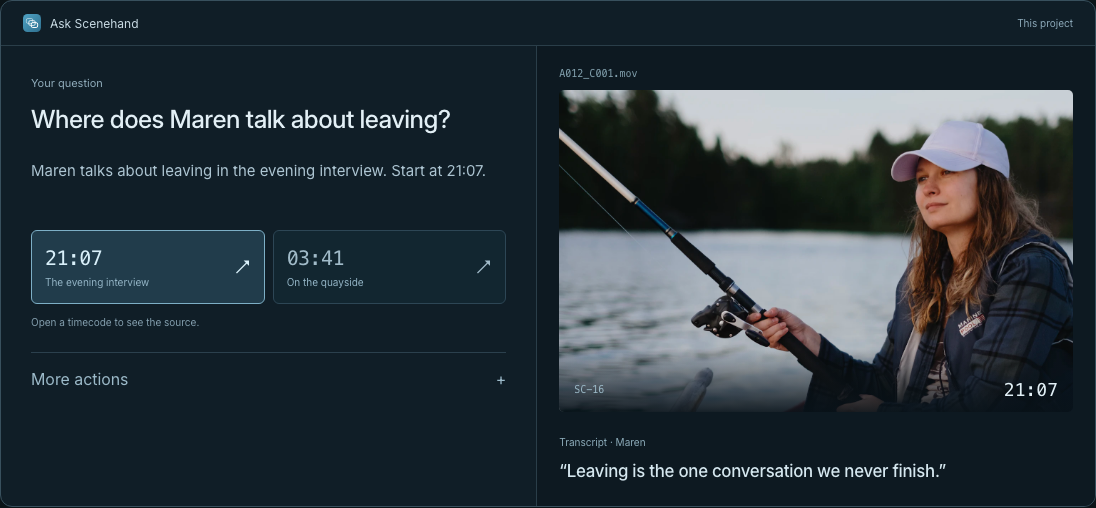
Ask, open and scoped to a project. Suggested questions sit above the field; each answer returns cited to a scene and a timecode you can play.

What kinds of questions can I ask?

Anything answerable from the footage: where a subject is discussed, which scenes cover a location, who appears most, whether you have enough coverage of something. Answers lead with the verdict and cite the scenes and timecodes behind it.

How do I know an answer is accurate?

Every claim carries a scene and a timecode you can play. Nothing is asserted without a citation, so you verify by clicking rather than trusting.

What does it mean when Ask says NOT SURE?

NOT SURE means the evidence in your footage is too thin to answer confidently. Ask says so instead of inventing a citation — a deliberate design choice, and the reason its answers can be trusted.

Can I limit a question to one file or scene?

Yes. Scope a question to the whole project, a single source file, or the scene you are looking at. The answer never wanders outside the scope you set.

Can Ask make changes to my project?

Ask can propose changes — jump to a moment, mark an in/out range, suggest a tag — and you approve each one. AI never silently changes a project.

Was this section helpful?
Ask →Reviewed 1 Sep 2026
05Story

What Story tells you before you open the timeline.

Scenehand
Story output for a project: who appears and how often, the themes running through the material, and the arc so far — each entry clicking through to its scenes.

What does Story actually produce?

People, themes, locations and the arc so far, plus the strongest soundbite in every scene and notes on what is missing. Every claim is cited to a scene and timecode.

When is Story most useful?

Before you have watched a frame, and again before you lock a cut. Early it tells you what you shot; late it flags gaps in the arc while you can still shoot them.

Was this section helpful?
Story →Reviewed 1 Sep 2026
06Transcripts & tags

Words, speakers and the tag library.

Scenehand
The shared tag library. Each tag carries a plain-language description telling Scenehand how to recognise it, so the whole team filters on the same vocabulary.

How do I get real names instead of “Speaker 1” in a transcript?

Speakers are labelled automatically as the transcript is built, and you can rename any of them once — the correction applies across the whole project, including citations already made.

Can I correct a speaker name or a mis-heard word?

Yes. Edit either in place. Speaker corrections propagate project-wide; word corrections update the search index immediately.

What can I get a transcript out as?

Clean, timecoded plain text, ready to paste into a script, a paper edit or production notes. Copy any range or the whole file.

Can I export subtitles as SRT or VTT?

Not yet. Transcripts come out as clean, timecoded plain text you can copy by range or by whole file, which suits a script or a paper edit but is not a subtitle format. Editorial export formats are deliberately out of scope for now — tell support if SRT or VTT would change how you work.

Which attributes are detected without me doing anything?

Shot size, camera angle, setting, roll type, the people on screen and recognisable on-screen objects — all applied as footage lands, before you touch it.

Can I add my own tags?

Yes, and they join one shared library so the whole team filters on the same vocabulary rather than inventing parallel systems.

Was this section helpful?
Transcripts →Reviewed 1 Sep 2026
07Comments & roles

Notes, reviewers and who can change what.

Scenehand
Comments across a project, filtered by state and by person. Each note is pinned to a scene and a timecode, with replies threaded underneath.

How do I leave a note on a specific moment?

Pin it to a single timecode or mark a whole range on the timeline. You can quote a transcript line, assign with an @mention, and resolve it when it is handled.

How many people can review a project without adding cost?

As many as you like. Viewer seats are free and unlimited, and a Viewer can browse, search, ask, play and comment — only people who change content need a billed seat.

What can each role do?

Viewers browse, search, ask and comment. Editors also change content. Managers additionally handle members and billing.

Was this section helpful?
Comments →Reviewed 1 Sep 2026
08Insights

The shape of a project, without counting.

Insights for a project: total footage analysed, the shot-mix breakdown, and the A-roll to B-roll split. Every figure clicks through to the scenes it was counted from.

What does the Insights view actually show?

Coverage and shot mix across the project, the A-roll to B-roll split, and who and where appears most. It is built from the same single analysis pass, so there is nothing to set up.

Can I get from a figure to the footage behind it?

Yes. Every stat clicks through to the scenes it was counted from, so a number is always one click from the material.

When are Insights most useful?

Before the edit starts, to see whether you have enough, and mid-shoot to spot a gap while you can still go and cover it.

Was this section helpful?
Insights →Reviewed 1 Sep 2026
09Slack integration

Your footage, answering where the team already works.

A question asked in #edit-suite and answered in the channel — the reply carries the scene, the source file and the timecode, so nobody takes the claim on trust.

What can I do from Slack?

Ask a question and get an answer cited to a scene and timecode, share a scene straight into a channel, and receive a note the moment new footage has finished analysing.

Do answers in Slack carry citations?

Yes. The same scene and timecode references come back in the channel, so nobody has to take a claim on trust.

Which Slack channels does it post to?

Whichever you connect. Point Scenehand at the channels your team already uses rather than creating new ones.

Was this section helpful?
Slack integration →Reviewed 1 Sep 2026
10Desktop app

Installing, updating and signing in.

Scenehand
The update panel in the desktop app: installed version and channel, the pending release, automatic downloads, and the full release history with per-version status.

The installer says my Mac is not supported — why?

Three requirements, in the order the installer checks them: an Apple silicon Mac (M1 or later), macOS 14 or newer, and free disk for the proxy cache. Intel Macs cannot run it at all, and a Windows build is still in development — on either, use the web app, which does everything except background drive ingest and local scrubbing. If your Mac meets all three and the installer still refuses, send support your chip and macOS version from About This Mac. Download the desktop app →

How do I update the app?

The desktop app checks automatically and downloads in the background. Updates install when you relaunch, never mid-edit, and you can check manually from Help → Check for Updates. Release notes for every version are in the version menu. Desktop app releases →

Can I choose between stable and beta builds?

Yes. Switch channel in the update panel. Stable ships only tested releases; Beta gets pre-release builds first, with rough edges expected.

Why can I not sign in to the desktop app?

Work through it in this order: confirm the web app signs in on the same machine and network; check that a VPN or proxy is not blocking the sign-in redirect, and allow the app through if it is; if your team uses SSO, confirm your account has been provisioned for Scenehand. If all three pass, quit and relaunch, then email support with the app version from the version menu.

Was this section helpful?
Desktop app →Reviewed 1 Sep 2026
11Billing & credits

How credits, seats and invoices work.

What is a credit, and how many hours does it buy?

A credit is the unit plans, packs and overage are measured in. One credit buys one hour of Standard analysis — transcript, scenes and frame tags. Studio’s deeper pass, which adds video embeddings, motion search and “more like this”, costs two credits an hour. Allowances are 20 credits a month on Standard, 45 on Studio and 65 pooled on Team — so 45 credits is 45 hours of Standard analysis, or 22.5 hours of Studio.

What happens when I run out of credits?

Analysis pauses rather than failing, and you can top up. Packs are 10 credits for $39, 25 for $89 and 50 for $159, with custom packs above 51. Your monthly allowance is always spent first; purchased credits are drawn on only once it runs out. Past both, overage is $4.00 per credit — $4.00 an hour of Standard analysis, $8.00 an hour on Studio.

Do top-ups expire?

No. Purchased credits never expire and roll over month to month. They sit behind your monthly allowance, which is always spent first, so buying ahead of a big shoot is safe.

How do seats work?

A seat unlocks access, not an allowance — the whole team draws from one shared pool of credits. Team includes 3 billed seats; extra seats are $39 each. Viewers are always free.

Can I change or cancel my plan?

Yes, at any time, from Settings → Billing. Cancelling stops future charges and leaves your library intact and exportable through the end of the period.

How do I download an invoice or receipt?

Settings → Billing → open the billing portal. Every invoice for the workspace is listed there as a PDF, alongside the card on file and the billing address. Managers can reach it; Editors and Viewers cannot.

Can I get a refund?

Cancelling stops future charges and the current period runs to its end, with your remaining credits usable until then — so in the normal case there is nothing to refund. For a duplicate or mistaken charge, email support@scenehand.studio with the invoice number and you will get a reply within one working day.

Was this section helpful?
Pricing →Reviewed 1 Sep 2026
12Privacy & security

Where your footage lives, and who can reach it.

How do I confirm our footage is excluded from AI training?

Your footage is excluded by default and there is no setting that opts you in. Everything Scenehand learns from it stays inside your project, is never shared, and is never used to train anything. Enterprise customers can have this stated contractually in a DPA. Clause 6 of the privacy policy →

Who can see my projects?

Only the people you invite. Projects live in your own private workspace, and you can remove everything at any time.

Can we run Scenehand on our own infrastructure?

Yes, on Enterprise. On-premise deployment, SSO and a DPA are all available, and your library moves with you if you migrate.

How do I delete a project?

From the project’s own settings. The project, its media and everything analysed from it — transcripts, scenes, tags and comments — go with it. This is immediate, and separate from deleting your account.

How do I delete my account?

Settings → Account → Delete account. The account is deactivated straight away and enters a 30-day cancellation window, during which you can restore it yourself and nothing is lost. At the end of the 30 days the account, its projects, media and analysis are purged permanently and cannot be recovered. Retention schedule →

How long do you keep my footage?

For as long as the project exists. Deleting a project removes its media and analysis; deleting your account starts the 30-day window above, after which everything is purged. There is no separate archive, and nothing is kept back for training. Retention schedule →

Do you show costs before heavy processing?

Yes. Any heavy processing shows an estimate before it runs, so a large re-analysis can never surprise you on the invoice.

Was this section helpful?
Privacy & security →Reviewed 1 Sep 2026
13Troubleshooting

Symptom, then what to do about it.

Ingest sits at 0% and does not move

Almost always the drive. Check it has not slept or been remounted and reconnect it — ingest resumes from the last completed chunk rather than restarting. If the volume is definitely mounted and readable, quit and relaunch the desktop app, then read the file report for a codec or permission error. If it stays at zero, send support the drive type and that report.

I cannot sign in, or I have forgotten my password

Use “Forgot password” on the log-in page — a single-use reset link is emailed to the address on the account. If nothing arrives, check spam, then confirm you are using the address you were invited on. If your organisation signs in with Google, Microsoft or SSO there is no Scenehand password to reset: use the same button you used the first time. Locked out of the email itself — your workspace Manager can re-invite you.

A file finished but no scenes appeared

Usually the file is audio-only, or carries an unsupported codec inside a supported container. Open the file report on the ingest queue — it names the stream it could not read. If the report is clean and there are still no scenes, the file may be shorter than a single scene; send support the filename and the report.

A speaker is labelled with the wrong name

Rename them once on any line in that project and it corrects everywhere, including past citations.

Ask keeps answering NOT SURE

The question is broader than the footage supports. Narrow the scope to a file or a scene, ask about something the material actually covers, or rephrase it in the words a speaker would have used. Ask will not guess to fill a gap — but a NOT SURE on a question you know the footage answers is worth reporting, with the project name and the question.

Search returns nothing for an obvious shot

Usually a filter left on from an earlier search. Clear filters, then search again with a plain description. If that does not do it: confirm the file has finished analysing, widen from scene view to file view, and try one word rather than a phrase. Still nothing — send support the filename and what you searched for.

Proxies are slow to appear on the desktop app

Proxy generation runs behind ingest by design, so it finishes after the footage is already searchable. Both continue in the background, and leaving the app open on power rather than battery is materially faster. If proxies are still missing once ingest has fully completed, check free disk space for the proxy cache.

Timecodes look offset against my NLE

The source file has no embedded timecode, so Scenehand starts at zero. Check the file report — it states whether timecode was found. If it was not, re-ingest from the original camera file with timecode present, or conform against the file report rather than the scene timecodes.

Was this section helpful?
Reviewed 1 Sep 2026
14Terminology

The words Scenehand uses, and what they mean.

Most of these appear in the app without explanation. If a term in an answer above was unfamiliar, it is here.

Credit
The unit plans, packs and overage are measured in. One credit = one hour of Standard analysis; a Studio hour costs two.
Pass
The single analysis run made over a file on ingest — transcript, scenes, tags and story notes all at once. There is no second pass to schedule.
Ingest
Reading footage from a folder or connected drive into a project. Runs in the background and resumes if the drive disconnects.
Scene
A story beat Scenehand cuts a file into. Search results, citations and comments all attach to scenes rather than whole files.
Scene card
The scrubbable thumbnail a scene appears as in search and browse. Hover to preview without opening the file.
Citation
The scene and timecode attached to every Ask answer and Story claim, so it can be played and checked rather than trusted.
NOT SURE
What Ask says when the footage cannot support a confident answer. It is never a guess.
Ask
Plain-language questions across a project, a file or a scene, answered with citations.
Story
The people, themes, locations, arc and soundbites Scenehand reads out of a project before you watch a frame.
Soundbite
The strongest quotable line in a scene, timecoded and attributed to a speaker.
Shot size
Wide, medium, close-up and their variants, detected per scene and available as a filter.
Roll
A-roll is primary interview or action; B-roll is supporting coverage. Detected automatically and shown in Insights.
Tag library
The shared, project-wide set of tags — automatic and your own — that the whole team filters on.
Proxy
A lightweight local copy the desktop app generates so scrubbing is instant. Optional, and never counted as a duplicate.
Seat
A billed member who can change content. Viewers browse, search, ask and comment for free, without limit.
Channel
Stable or Beta — which desktop-app releases you receive. Switch in the update panel.
Was this section helpful?
Reviewed 1 Sep 2026
15Still stuck

Reach a person.

Product & technical

Ingest, search, Ask, the desktop app, anything not working as described here.

support@scenehand.studio
Plans, seats & Enterprise

Team rollouts, on-premise, SSO, a DPA, or volume pricing.

Talk to sales →
What to include so we can fix it first time
The project name and the source file or scene, with its timecode
What you expected and what happened instead
Whether it is the web app or the desktop app, and the app version from the version menu
For ingest problems: the drive type and the codec, from the file report

Not a customer yet?

Bring a real shoot. The trial is the fastest way to find out whether any of the above matters to you.

Start free trial 14 days · 5 credits · no card required